
Ask RaceMetrics lets you query the entire Proform Racing database using plain English. An AI engine translates your question into a database query and returns the results instantly.
Accessing Ask RaceMetrics
- Open the System Builder menu in the navigation bar and choose Ask RaceMetrics
Ways to Query
- Type a question: Ask anything in natural language, e.g. "Top 10 trainers by strike rate at Cheltenham this year"
- Query Recipes: Choose from 11 recipe types below the input box to build a precise query without typing — see the full Recipe Guide below. The Today's Angles recipe carries 40+ preset conditions, including trainer course records, trainer temperature, yards that won yesterday, going + course-and-distance proven runners on a winnable mark, DOB candidates, quick turnarounds and stride pars (the stride pars need the Sectionals add-on)
- Voice input: Click the microphone icon to dictate your question (Chrome/Edge)
Keyword Guide
The Keyword Guide shows every word the system recognises. Click any keyword to insert it into your query. Browse categories like Time Periods, Race Types, Going, and more.
Slash Commands
Type / in the input box to see available commands. These give you instant reference information without using a query:
/help— Quick usage guide/fields— Browse all queryable data fields/groupby— See all ways to group/present results/filters— View all filter keywords the AI understands/examples— Clickable example queries/tips— Tips for writing better queries/history— Open your query history
What You Can Ask About
- Trainers, Jockeys, Horses: Strike rates, records, P/L, trends
- Sires, Dams, Damsires: Progeny statistics, going preferences
- Courses & Festivals: Track records, festival stats (Cheltenham, Ascot, etc.)
- Power Ratings: Proform power rating figures, ranks, forecast odds
- Speed Figures: Speed ratings, LTO ratings, historical comparisons
- Pace Data: Pace ratings, running style analysis
- RaceMetrics Ratings: the ratings, rating changes, biggest movers
- Market Data: Starting prices, Betfair SP, forecast prices
Viewing Results
- Table view: Sortable columns (click headers), participant names link to profiles
- Chart view: Bar, Stacked Bar, Line, Pie, Polar Area, Horizontal Bar
- Export: Download as CSV or chart as PNG
Query Limits
Pro and Premium members get 100 questions a day. Your remaining queries are shown below the input box. Queries reset at midnight.
Ask from your own AI app: the RaceMetrics Connector (Premium)
As well as the Ask box on our site, Premium members can connect their own AI app (Claude, ChatGPT and Codex, or Gemini) to RaceMetrics and ask about the racing in plain English there. The app reads our data directly: today's racecards and runners, form and results, RaceMetrics Ratings and RMP, prices, the entries and big-race entries, and the System Builder's back-tests, breakdowns and qualifiers. It can turn an answer into a chart or a race-day page you can keep.
Set it up from Connect your AI (on your account page). Pick your app, then three steps: copy the connector address shown on the page, add it in your app as a custom connector, then sign in with your RaceMetrics account and click Allow. You never type your password into the AI app, and you can disconnect an app on the same page.
- Claude: Customize, Connectors, Add, Add custom connector.
- ChatGPT: on the web, Plugins, Add, Add custom MCP server.
- Gemini: on the web, Customize, Connectors, Custom. Gemini only uses connectors while its Keep activity setting is on.
Daily allowances apply to the rows and pages an app reads. We record the requests the app makes and the question as the app passes it on, never your conversation. The free versions of these apps work too, with a less powerful model.
Tips for Better Results
- Be specific with time periods: "this year", "last 30 days", "from April 2025"
- Name your metric: "strike rate", "P/L", "ROI", "level stakes profit"
- Set minimum runs: "with at least 10 runners"
- Use "by" for grouping: "by trainer", "by going", "by course"
- Combine filters naturally: "handicap hurdles on soft ground this year"
- Use custom date ranges: "from 1st April 2025 to 30th October 2025"
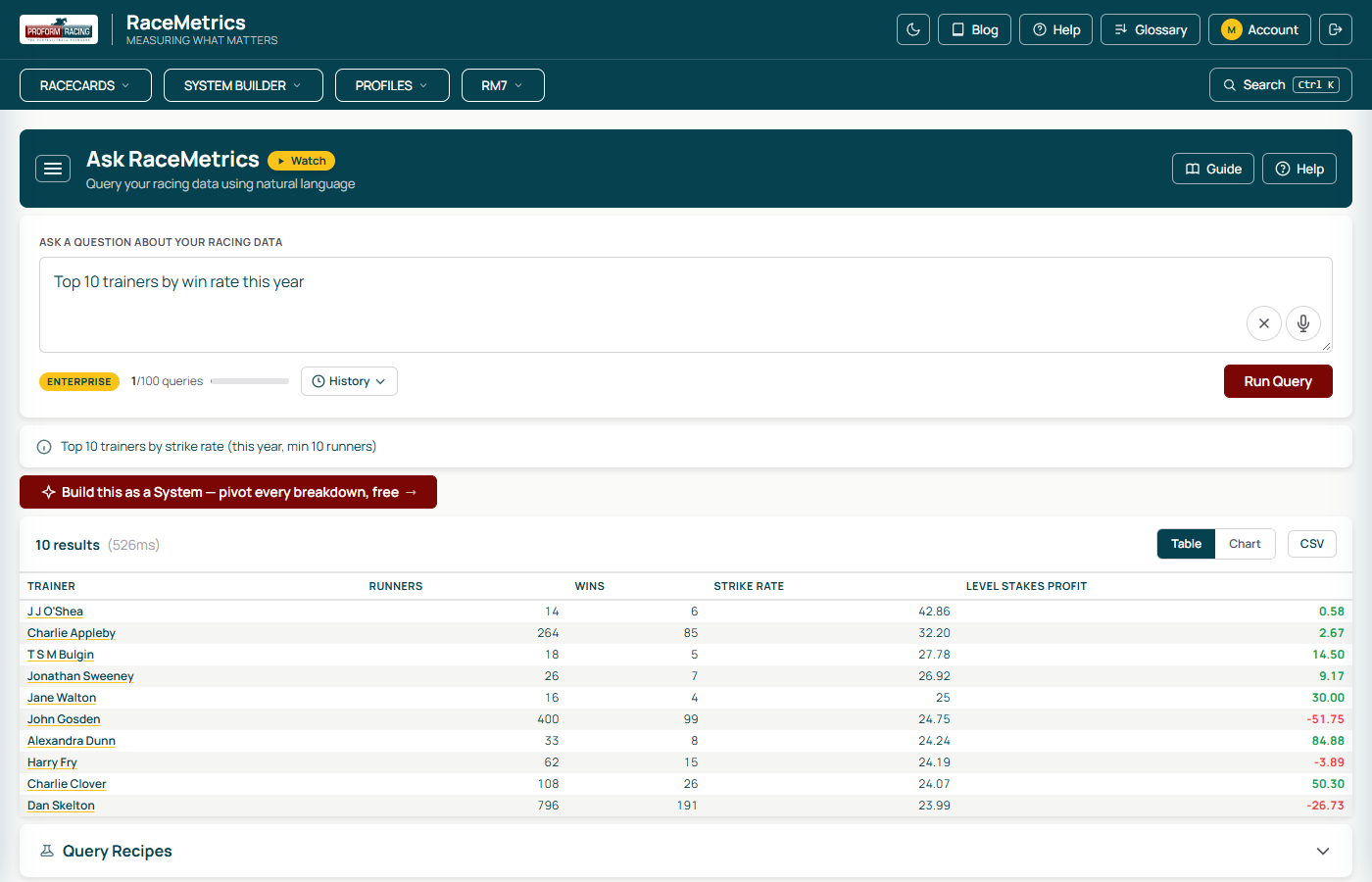
Ask RaceMetrics showing a natural language query with results table, featuring the query input box and AI-generated response